您现在的位置是:网站首页> 编程资料编程资料
python3中requests库重定向获取URL_python_
 2023-05-25
441人已围观
2023-05-25
441人已围观
简介 python3中requests库重定向获取URL_python_
前言:
有时候 我们抓取一些页面,发现一些url 有重定向, 返回 301 ,或者302 这种情况。 那么我们如何获取真实的URL呢? 或者跳转后的URL呢?
这里我使用 requests 作为演示
假设我们要访问 某东的电子商务网站,我只记得网站好像是 http://jd.com
import requests def request_jd(): url = 'http://jd.com/' #allow_redirects= False 这里设置不允许跳转 response = requests.get(url=url, allow_redirects=False) print(response.headers) print(response.status_code)
看结果 返回response header 中有一个属性 Location ,代表重定向了 'Location': 'https://www.jd.com'

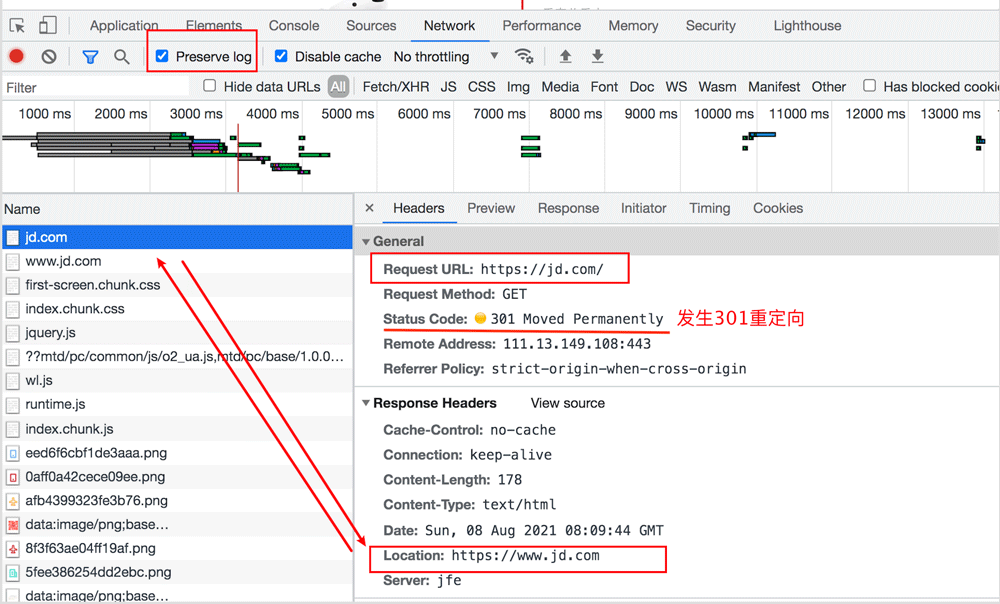
我们在浏览器中 chrome network 面板 ,抓包观察。 注意把 preserve log 这个选项勾选上。
从 浏览器的response header 中 我们可以看到 Location, 从 General 我们可以看到 status code 301 ,发生了跳转。
方法1:
你现在知道如何获取跳转后的URL了吗,直接从response header,获取 Location 即可。
在request.header 中 返回header 的key是不区分大小写的, 所以全小写也是可以正确取值的。
import requests def request_jd(): url = 'http://jd.com/' response = requests.get(url=url, allow_redirects=False) #return response.headers.get('location') return response.headers.get('Location')方法2:
其实默认情况下, requests 会自动跳转,如果发生了重定向,会自动跳到location 指定的URL,我们只需要访问URL, 获取response, 然后 response.url 就可以获取到真实的URL啦。
import requests def request_jd(): url = 'http://jd.com/' response = requests.get(url=url) return response.url
到此这篇关于python3中requests库重定向获取URL的文章就介绍到这了,更多相关python获取URL 内容请搜索以前的文章或继续浏览下面的相关文章希望大家以后多多支持!
相关内容
- python中内置类型添加属性问题详解_python_
- python项目报错:bs4.FeatureNotFound: Couldn‘t find a tree builder with the features you requests_python_
- PyTorch中torch.utils.data.DataLoader实例详解_python_
- Python重试库 Tenacity详解(推荐)_python_
- Python制作数据分析透视表的方法详解_python_
- Python+fuzzywuzzy计算两个字符串之间的相似度_python_
- Python利用redis-py实现哈希数据类型的常用指令操作_python_
- python 中collections的 deque使用详解_python_
- python字符串操作的15种方法汇总_python_
- Python实现打印金字塔图案的方法详解_python_